
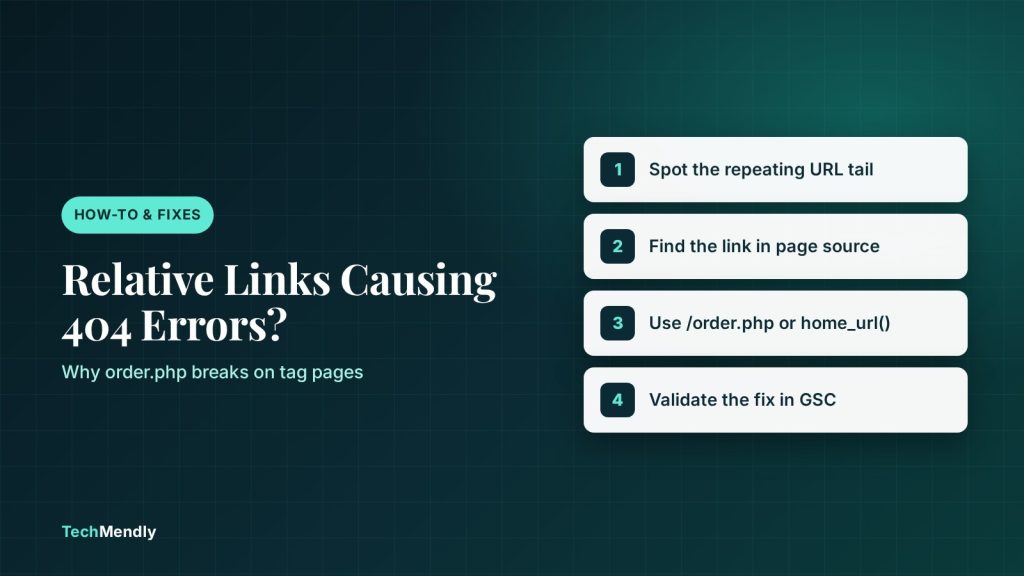
Relative links causing 404 errors in WordPress almost always come from an href with no leading slash, such as href="order.php". The browser (and Googlebot) builds the final address from the page the link sits on, so the same link points to a different URL on every tag page, category page and paginated page. Fix it by changing the link to a root-relative path (/order.php) or a full URL, then find the old bad URLs in Google Search Console.
You open Search Console and see a pile of “Not found (404)” URLs that you never created. They look like /tag/wordpress/order.php or /category/news/page/3/order.php. Nobody typed those. Your own site generated them.
This is one of the most common causes of relative links causing 404 errors in WordPress, and it is easy to miss because the link works on the page you tested it on. On client sites we’ve seen a single href="order.php" in a theme widget produce hundreds of junk URLs once the blog had tag pages and pagination.
Below: how the browser resolves a relative link, why it breaks only on some pages, how to find every offender, and how to fix it so it stays fixed.
Why relative links causing 404 errors in WordPress happen
A relative link has no domain. The browser takes the address of the page the link is on and works out the target from it. The rule is defined in RFC 3986, section 5.2: when the link path does not start with a slash, the browser drops the last segment of the current page’s path and appends the link to what is left.
That last detail is the whole problem. WordPress uses pretty permalinks that end in a slash, so the “current folder” of a page is the page itself. A link written as order.php on /tag/wordpress/ becomes /tag/wordpress/order.php, which does not exist.
On the home page the same link resolves to /order.php, which does exist. That is why it passes your quick check and still creates junk URLs everywhere else.
| What you wrote | Type | Resolves to on /tag/wordpress/ | Safe? |
|---|---|---|---|
order.php |
Directory-relative | /tag/wordpress/order.php | No |
./order.php |
Directory-relative | /tag/wordpress/order.php | No |
../order.php |
Parent-relative | /tag/order.php | No |
/order.php |
Root-relative | /order.php | Yes |
https://example.com/order.php |
Absolute | https://example.com/order.php | Yes |
MDN lists these link types, with the same names, in its anchor element reference. Google also spells out the risk: its URL structure guidance warns that a parent-relative link on the wrong page can create infinite spaces, and says to use root-relative URLs instead.
Google’s link documentation lists absolute, root-relative (/products/shoes) and dot-relative (./products/shoes) links as formats it can resolve. The format is not the problem. A relative link is only correct on the one page depth it was written for.
Where these links usually hide
You rarely type a bad link into a post on purpose. They tend to come from places that render on many different URLs at once:
- A sidebar, footer or header widget with a hand-typed link, shown on every page and archive.
- A custom HTML block or theme template copied from a static HTML site, where
order.phporcontact.htmlworked from a single folder. - A menu item added as a “Custom Link” with no domain.
- A page builder button or text link where someone typed a path without the leading slash.
- Old content imported from another CMS, where links were stored relative to the old folder structure.
Pagination multiplies the damage. One bad link in a footer shown on /tag/wordpress/, /tag/wordpress/page/2/ and /tag/wordpress/page/3/ creates three different dead URLs, and Googlebot follows every one.
How to find every bad relative link
Start from what Google has already seen, then confirm in the page source.
- Open the 404 list. In Search Console go to Indexing > Pages and open the “Not found (404)” reason. Google’s Page indexing report documentation says 404s are not always a problem, but recommends fixing the ones you link to yourself.
- Spot the pattern. Look for the same file name tacked onto many different paths, for example the same
order.phpat the end of tag, category and/page/2/URLs. A repeated tail is the signature of one relative link. - Check the referring page. Click a URL in the report and open Inspect URL. If the referrer is one of your own pages, view that page’s source (Ctrl + U) and search for the file name.
- Find the source of the link. If it appears on every page, it is in a widget, the header, the footer or a template. If only on some, check the post content and menus.
- Test a suspect URL. Open it in the browser. A 404 page confirms the path does not exist. Our guide on checking if Googlebot can crawl a page shows how to confirm what Google actually receives.
Search the page source for href=" followed by a letter, not a slash or http. Any link starting with a plain word is directory-relative and worth a look.
Fix the link, not the symptom
The cleanest fix is to correct the link where it lives. Which tool you use depends on where it hides.
In posts, pages and custom HTML blocks
Change href="order.php" to href="/order.php", or use the full address. A leading slash tells the browser to start at the site root, whatever page the link sits on. If your site lives in a subfolder, the full URL is safer.
In theme templates and PHP
Use home_url(). According to the WordPress developer reference, it returns the front-end address of the current site and accepts an optional path:
<a href="<?php echo esc_url( home_url( '/order.php' ) ); ?>">Order</a>
This also keeps the link correct if you later move the site to another domain or switch between HTTP and HTTPS.
In menus and widgets
Edit the Custom Link under Appearance > Menus (or the Menus panel in your block theme) and put the full URL in the URL field. For widgets, open the widget and fix the href the same way.
If a base tag is involved
A <base href> element changes how every relative URL on the page resolves. MDN’s base element page notes that even #anchor links are resolved against it. If a plugin or theme adds one with the wrong address, relative links and in-page anchors can jump to the wrong place. View source and search for <base if links go somewhere odd.
Do not add a blanket redirect for every /anything/order.php URL as your first move. That hides the bug and sends Googlebot on a detour for every junk URL. Fix the source first.
What to do with the old 404 URLs afterwards
Once the link is fixed, the junk URLs will stop being discovered. They will stay in the report for a while. Google says it may keep retrying a 404 URL for some time, and that the Page indexing report only shows URLs that returned 404 in the past month.
- Clear any page, server or Cloudflare cache so visitors and Googlebot see the fixed HTML. Our cache order guide for Elementor covers the layers in the right sequence.
- Reload a tag page and a
/page/2/page, view source, and confirm the link now starts with a slash or the full domain. - In Search Console, open the 404 report and use Validate fix.
- Leave the leftover URLs as 404. They never held content, so there is nothing to redirect.
Only add a 301 redirect if a URL had real traffic or inbound links from other sites. Google’s own advice for a moved page is a 301 to the new location.
Relative vs absolute links: which should you use?
You do not have to use full URLs everywhere. Root-relative links are fine and keep content portable between staging and live. What to avoid is the directory-relative form, the one with no leading slash.
| Link style | Example | Good for | Watch out for |
|---|---|---|---|
| Absolute | https://example.com/order.php |
Menus, emails, anything shared or syndicated | Breaks on domain or protocol change |
| Root-relative | /order.php |
Internal links in posts and templates | Wrong if the site sits in a subfolder |
| Directory-relative | order.php |
Static sites with a flat folder | Changes meaning on every URL depth |
If a link has no leading slash and no domain, its target depends on the page it appears on. On WordPress, with tag, category and paginated URLs, that creates dead URLs on every archive. Make links root-relative or absolute, use home_url() in code, then validate the fix in Search Console.
Frequently asked questions
Do relative links hurt SEO?
Not in themselves. Google can resolve absolute, root-relative and dot-relative links. The harm comes when a link resolves to a URL that does not exist, which wastes crawling and fills your 404 report.
Why does my link work on the home page but not on other pages?
On the home page the current folder is the site root, so order.php becomes /order.php. On /tag/wordpress/ the browser appends it to that path instead.
Should I use absolute URLs for all internal links?
You can, but you do not have to. Root-relative links such as /order.php are reliable and easier to move between environments. Just avoid links with no leading slash.
Will 404 URLs from this bug hurt my rankings?
Google says 404 responses are not necessarily a problem for pages that never existed. Fix the links that point to them so crawl time goes to real pages.
How do I find bad links across the whole site?
Start with the 404 report in Search Console, look for a repeating file name, then search the page source and your theme files for that link.
Sources: RFC 3986; Google Search Central, URL structure; Google Search Central, crawlable links; Search Console Help, Page indexing report; MDN, a element; MDN, base element; WordPress Developer Resources, home_url(). Checked October 2026.
More in How-To & Fixes

Squarespace Tax Not Showing at Checkout? 6 Fixes to Try
Squarespace tax not showing at checkout? Find the cause in your automated or manual setup, registrations or Include in price, and fix it in minutes.
WordPress REST API Returning Old Data? Fix the Cache
WordPress REST API returning old data? Find the cache serving stale JSON, then bypass /wp-json/ in Cloudflare, LiteSpeed or WP Rocket and purge it.

WooCommerce Showing Wrong Currency? 5 Fixes That Work
WooCommerce showing wrong currency? Find the setting, plugin, code snippet or cached page behind it and fix the symbol, prices and store location.