
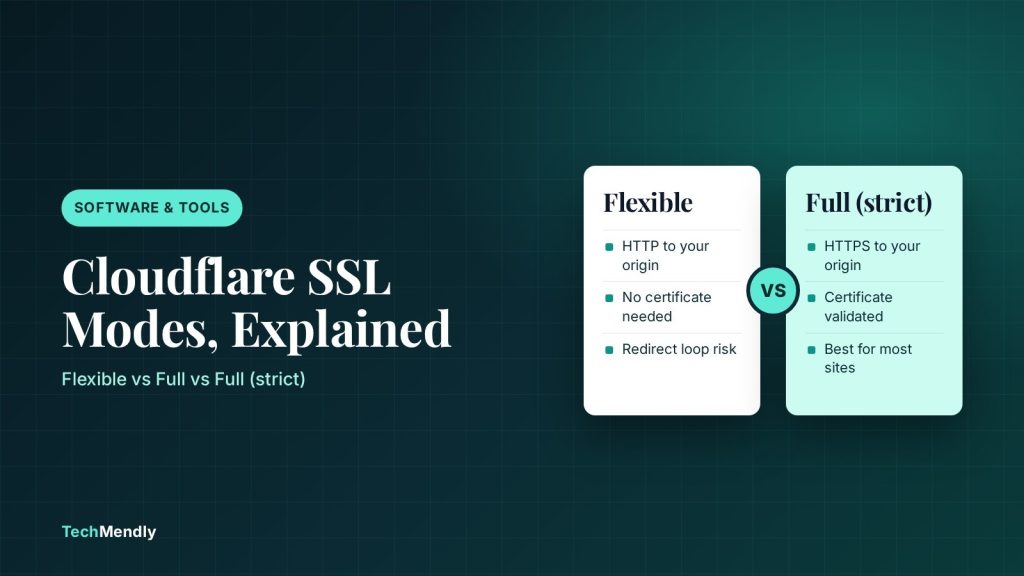
Cloudflare SSL modes only decide how Cloudflare talks to your hosting server. Visitors get HTTPS in every mode except Off. Use Full (strict) if your server has a valid certificate (a free Cloudflare Origin CA certificate counts), Full if the certificate is self-signed, and Flexible only when your host cannot serve HTTPS at all.
Cloudflare SSL modes are the most misunderstood setting in the dashboard. The names sound like they control whether your site shows the padlock. They do not. They control the second half of the journey, the connection between Cloudflare and your origin server, and picking the wrong one is behind a large share of redirect loops, 525 errors and “my site is secure but my server is not” setups.
This guide explains each mode using Cloudflare’s own documentation, shows which one fits which hosting situation, and gives you a safe order of steps for switching. If you are already stuck in a loop, jump to our Cloudflare too many redirects fix instead.
Two connections, not one
When a visitor opens your site through Cloudflare, two separate connections exist. The first is visitor to Cloudflare. The second is Cloudflare to your origin server. The SSL/TLS encryption mode only changes the second one. That is why you can see a padlock in the browser while the traffic behind Cloudflare is still travelling as plain HTTP.
- Visitor to CloudflareCovered by Cloudflare’s own certificate. Encrypted in every mode except Off.
- Cloudflare to your originThis is the leg the mode changes: plain HTTP, matched to the visitor, or HTTPS with or without certificate checks.
- Your origin serverNeeds a certificate on port 443 for every mode except Off and Flexible.
Pick the mode that matches what your origin can really do, not the strongest name on the list.
Cloudflare SSL modes compared
Cloudflare lists five encryption options. Four are available to everyone, and the fifth is Enterprise only.
| Mode | Cloudflare to origin | Origin certificate | Typical use |
|---|---|---|---|
| Off | HTTP, and visitors are not encrypted either | None | Testing only |
| Flexible | HTTP (unencrypted) | Not needed | Host cannot install a certificate |
| Full | Same scheme the visitor used, no certificate validation | Any, including self-signed or expired | Origin has a certificate you cannot make public |
| Full (strict) | HTTPS with certificate validation | Valid public CA certificate or Cloudflare Origin CA | Best choice for most sites |
| Strict (SSL-Only Origin Pull) | Always HTTPS with validation | Same as Full (strict) | Enterprise plans only |
Flexible: only when your server cannot do HTTPS
In Flexible mode the visitor’s connection is encrypted but Cloudflare reaches your origin over plain HTTP. Cloudflare says this mode suits origins that cannot support TLS and recommends upgrading the origin whenever possible. It describes the site as only partially secure and says to use Full or Full (strict) for anything with logins or personal data. That includes WooCommerce stores and WordPress sites with user accounts.
Flexible also has a well-known trap. If your origin redirects all HTTP requests to HTTPS, which most WordPress SSL plugins and hosting panels do, Cloudflare asks for HTTP, gets redirected, asks again and the browser ends up on ERR_TOO_MANY_REDIRECTS. Cloudflare’s own documentation says not to use Flexible when the origin redirects to HTTPS.
Flexible mode does not work with Authenticated Origin Pull, so you cannot lock your origin down to Cloudflare traffic while using it.
Full vs Full (strict): the certificate check
Both modes need an HTTPS-capable origin on port 443. The difference is whether Cloudflare checks the certificate it is shown.
Full
Cloudflare connects to the origin using the same scheme as the visitor, so HTTPS visitors get HTTPS to the origin and HTTP visitors get HTTP. The certificate can be self-signed, expired or even have the wrong hostname, because Cloudflare does not validate it. Cloudflare notes that without validation an attacker could potentially hijack the connection between Cloudflare and your server.
Full (strict)
Here Cloudflare validates the certificate. It must be unexpired, issued by a publicly trusted certificate authority or by Cloudflare Origin CA, and its name must cover the hostname being requested. If those conditions are not met, visitors can see a 526 error. A free Let’s Encrypt certificate from your host works, and so does a Cloudflare Origin CA certificate, which is available on every plan including Free.
Origin CA certificates only encrypt traffic between Cloudflare and your server. Browsers do not trust them on their own, so visitors can see certificate warnings if you pause Cloudflare or turn the proxy off for that hostname. Cloudflare also does not send expiry reminders for them, so put the renewal date in your calendar.
If cPanel’s AutoSSL keeps failing behind the proxy, our AutoSSL and Cloudflare guide walks through the Origin CA route step by step.
Which Cloudflare SSL mode should you choose?
| Your situation | Mode to use |
|---|---|
| Host gives a working certificate (Let’s Encrypt, AutoSSL, a paid one) | Full (strict) |
| Host has no valid certificate, but you can install a Cloudflare Origin CA certificate | Full (strict) |
| Origin has a self-signed certificate you cannot replace yet | Full, then upgrade to Full (strict) later |
| Host cannot serve HTTPS at all and you cannot change host | Flexible, with no HTTPS redirect on the origin |
| Enterprise plan that wants HTTPS to the origin every time | Strict (SSL-Only Origin Pull) |
For nearly every WordPress or WooCommerce site on shared hosting, the answer is Full (strict). It is also the setting that most closely matches what site owners think they already have. If you are weighing up the plan itself, see what the Cloudflare free plan includes.
What Automatic SSL/TLS changes
Cloudflare now offers Automatic SSL/TLS as the default. Its recommender scans your site and can move the mode to a more secure option based on what your origin supports. It will not move you to a less secure mode, so if your origin certificate later expires on a Full (strict) site, nothing downgrades you, and visitors can hit errors until you renew it. Cloudflare says the scans run roughly monthly and upgrades roll out gradually, so a change may not appear instantly. You can opt out by setting ssl_automatic_mode to custom through the API.
How to switch modes without breaking the site
- Confirm the origin certificate. Open your site’s address with
https://while Cloudflare is paused for that hostname, or check the certificate in your hosting panel. Note the expiry date and the hostnames it covers. - Check WordPress addresses. In Settings > General, both the WordPress Address and Site Address should start with
https://. - Fix redirects first. Remove HTTP to HTTPS redirects that conflict with your plan. If you stay on Flexible, the origin must not redirect to HTTPS.
- Change the mode. In the Cloudflare dashboard, open SSL/TLS > Overview and choose Full, then Full (strict) once the page loads cleanly.
- Test. Load the home page, a post, wp-admin, and checkout if you run WooCommerce. Look for the padlock, mixed content warnings and any 525 or 526 page.
- Purge caches. Clear your plugin and Cloudflare caches so visitors do not keep an old redirect.
Switch in the order Flexible to Full to Full (strict). If something breaks at Full, you know it is the origin not answering on HTTPS. If it breaks only at Full (strict), you know the certificate is the problem.
Errors you may see after changing the mode
| Symptom | Likely cause | Fix |
|---|---|---|
| ERR_TOO_MANY_REDIRECTS | Flexible mode with an origin that redirects to HTTPS, or Always Use HTTPS with an origin that redirects back to HTTP | Remove the origin redirect, disable Always Use HTTPS, or move to Full or higher |
| 525 error | Origin cannot serve HTTPS on port 443 in Full mode | Install a certificate and enable HTTPS on the origin |
| 526 error | Certificate is expired, untrusted or does not match the hostname in Full (strict) | Renew or replace the certificate, or install an Origin CA certificate |
Mail problems after moving a domain are a separate issue, since proxied records can hide your mail host. That one is covered in email not working after switching to Cloudflare.
Choose Full (strict) whenever your server has a valid certificate or you can add a Cloudflare Origin CA certificate. Use Full as a stepping stone for self-signed certificates, and keep Flexible for hosts that truly cannot do HTTPS, with no HTTPS redirect on the origin.
Frequently asked questions
What is the best SSL mode for WordPress on Cloudflare?
Full (strict) is the best fit when your host serves a valid certificate, because Cloudflare then encrypts and validates the origin connection. Cloudflare strongly recommends Full or Full (strict) over Flexible.
Is Cloudflare Flexible SSL safe?
It encrypts the visitor’s connection, but the leg between Cloudflare and your server stays unencrypted. Cloudflare calls the site partially secure and advises Full or Full (strict) for logins and personal data.
What is the difference between Full and Full (strict)?
Full accepts any certificate on the origin, including self-signed or expired ones. Full (strict) validates it, so it must be unexpired, from a public CA or Cloudflare Origin CA, and match the hostname.
Why do I get a redirect loop with Flexible SSL?
Cloudflare contacts your origin over HTTP in Flexible mode. If the origin redirects every HTTP request to HTTPS, the request bounces back and forth until the browser gives up.
Can I use a Cloudflare Origin CA certificate on the free plan?
Yes. Cloudflare lists Origin CA certificates as available on Free, Pro, Business and Enterprise plans. Create one under SSL/TLS > Origin Server > Origin Certificates.
Sources: Cloudflare SSL/TLS encryption modes; Full (strict) mode; Flexible mode; Full mode; Strict (SSL-Only Origin Pull); Origin CA certificates; Too many redirects troubleshooting. Checked October 2026.
More in Software & Tools
Shopify Automated Policies: What Changed and What to Check
Shopify can now write and update your store policies for you. See what changed on 8 October 2026, who it affects, and what to check before you switch it on.
WordPress 7.1.3 Security Update: What to Check Now
WordPress 7.1.3 fixes 7 security issues and 4 bugs. See who is affected, how to update safely, and the cache cleanup the update does not do for you.
Google September 2026 Spam Update: What Site Owners Should Check
Google's September 2026 spam update began on 24 September. Here's how to tell if your site was hit, and the five WordPress checks worth running right now.