
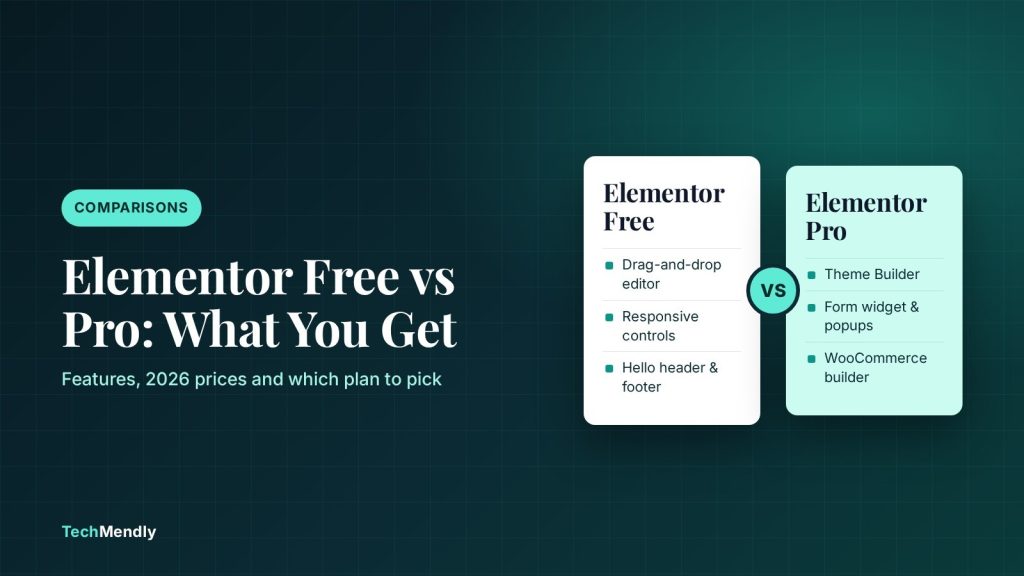
In the Elementor free vs Pro decision, free is enough for brochure sites built with the Hello theme: you get the drag-and-drop editor, responsive controls and a basic header and footer. Pro is worth paying for when you need the Theme Builder, a native Form widget, popups, dynamic content or custom WooCommerce layouts. Pick the cheapest plan that covers the one feature you actually need, not the biggest bundle.
Most people asking about Elementor free vs Pro have already built a page or two with the free plugin and hit a wall. The header looks generic, the contact form needs another plugin, or the shop pages ignore everything they designed.
We build client sites on both versions of Elementor. This guide sets out exactly what the free plugin does, what each Pro feature adds, which free workarounds hold up in practice, and how to pick a plan without paying for things you will never switch on. Every feature and price below was checked against Elementor’s own pages in October 2026.
What Elementor free actually includes
The free Elementor Website Builder plugin on WordPress.org is not a demo. At version 4.3.4 (released 5 October 2026), it has 10+ million active installs and gives you the full visual editor with:
- The drag-and-drop editor with containers for layout.
- A set of core widgets (the WordPress.org listing says “over 40”), including Heading, Image, Text Editor, Button, Video, Icon List, Nested Tabs, Nested Accordion, HTML and Shortcode.
- Responsive editing with custom breakpoints for desktop, tablet and mobile.
- Access to a smaller template library.
For a five-page business site with a home page, about, services and a contact page, that covers most of the design work. What free does not cover is anything that lives outside a single page: site-wide templates, forms that send email, popups and data pulled from custom fields.

What Elementor Pro adds
According to Elementor’s own free vs Pro guide (updated June 2026), Pro adds 86 widgets on top of the free set. In day-to-day client work, five of them are why people upgrade.
Theme Builder
This is the big one. The Theme Builder lets you design the header, footer, single post template, blog archive and 404 page visually, then choose where each one shows with display conditions. Without it, your theme controls those areas, and you only design the content in the middle of each page.
Form widget
Free Elementor has no form widget. Pro’s Form widget handles contact forms, multi-step forms, webhooks and integrations from inside the editor, so the form matches the rest of the design without extra CSS.
Popup Builder
Build newsletter popups, exit-intent offers or announcement bars with the same editor and the same display conditions as the Theme Builder.
Dynamic content and the Loop Grid
Dynamic Tags pull text, images and links from post data and custom fields (ACF, Pods, Toolset). The Loop Grid lets you design one card and repeat it for a list of posts or products. This is how you build a proper blog listing or a team page that updates itself.
WooCommerce builder
Pro adds WooCommerce widgets and templates for single product pages, product archives, cart, checkout and the My Account page. Free Elementor can drop a WooCommerce shortcode on a page, but you cannot redesign the core shop templates.
Elementor free vs Pro: feature comparison table
Here is the side-by-side we use when a client asks whether they need to upgrade. The plan names come from Elementor’s pricing page, which matters because the cheapest Pro plan leaves out several features people assume are included.
| Feature | Free | Pro Essential | Advanced Solo and above |
|---|---|---|---|
| Drag-and-drop editor, containers, responsive controls | Yes | Yes | Yes |
| Theme Builder (header, footer, single, archive, 404) | No | Yes | Yes |
| Form widget | No | Yes, but submissions are not stored | Yes, with form submissions |
| Popup Builder | No | No | Yes |
| Dynamic content | No | Yes, without custom fields or custom post types | Yes, including custom fields |
| WooCommerce (eCommerce) widgets | Shortcodes only | No | Yes |
| Custom code and custom CSS | No | No | Yes |
| Sites per licence | Unlimited | 1 | 1 (Solo), 3 (Advanced), 25 (Expert) |
Essential is the cheapest plan, so it is tempting, but it leaves out a lot. If you need popups, WooCommerce templates, stored form entries or custom CSS, Essential will not do it. Check the table before you pay.
How much Elementor Pro costs in 2026
Elementor’s pricing page says plans start at $60 per year. Its June 2026 guide lists these yearly prices for the main plans:
- Essential: $60 a year, 1 site.
- Advanced Solo: $84 a year, 1 site.
- Advanced: $99 a year, 3 sites.
- Elementor One: $168 a year, 1 site, adds 25,000 AI credits a month plus image optimisation, accessibility, cookie consent and email tools.
A few details from the pricing page that people miss:
- Prices exclude tax, and subscriptions renew at the list rate for the billing cycle, so check the renewal price at checkout, not just the first-year price.
- The 30-day money-back guarantee applies only to annual plans.
- Expert covers 25 sites. Its price was not shown in the version of the page we checked, so look at the live page.
The jump from Essential to Advanced Solo is $24 a year. For most business sites that is the better buy, because it adds popups, form submissions, custom CSS and WooCommerce widgets.
What happens if your Pro licence expires
Elementor’s help article on what happens if you don’t renew Elementor Pro says anything built with the free version keeps working. What changes: you can no longer update Pro, you cannot add new Pro widgets or dynamic tags, and you may only have limited access to the Pro features already on the site.
The bigger risk is drift. If you keep updating the free Elementor plugin while Pro stays frozen on an old version, the two can fall out of step and something eventually breaks. If a client site depends on Pro features, budget for the renewal like you would for hosting.
Free workarounds that hold up
If you are not ready to pay, these are the free options we use on real client sites. Each one has a trade-off.
Header and footer with the Hello theme
The free Hello Elementor theme adds its own header and footer controls to Elementor’s Site Settings panel. You do not need Pro for these.
- Open any page with Elementor and open Site Settings from the editor’s main menu.
- Choose Hello Theme Header. Toggle Site Logo, Tagline and Menu on or off, pick a Layout (Default, Centered or Inverted), set Width to Boxed or Full Width and choose a background.
- Go back and choose Hello Theme Footer. The same controls appear, plus a Copyright toggle.
- Click Update and check the result on mobile using the responsive preview.
The limit: you get the theme’s layouts, not a free-form design. You cannot drop a button, social icons or a phone number into the header. Hiding all the elements only hides them visually; to remove the theme header or footer completely, the settings point you to the Hello Theme Settings page.

Using a transparent header on top of a hero section? Watch for page titles that disappear white on white. We cover that exact problem in Hello Elementor page title not showing.
Forms without Pro
Use a free form plugin and place its shortcode with Elementor’s free Shortcode widget. Contact Form 7 and the free version of WPForms both work. Our Contact Form 7 vs WPForms comparison covers which one fits which site. Whichever you choose, set up SMTP so the messages actually arrive; see WordPress contact form emails not arriving.
Custom CSS without Pro
With a classic theme such as Hello Elementor, WordPress’s own Customizer has an Additional CSS panel (Appearance, then Customize, then Additional CSS). It is site-wide rather than per widget, but it handles the small fixes most sites need.
Add-on plugins
Third-party add-on packs can add header builders, popups and extra widgets to free Elementor. They work, but every add-on is another plugin to update and another place for conflicts. On client sites, we would rather pay for one Pro licence than maintain three add-ons doing the same job.
Is Elementor Pro worth it? Our decision guide
Start with the feature you are missing, then pick the cheapest plan that includes it.

Stay on free
Best for: simple brochure sites and blogs
- The Hello theme header and footer look fine for your brand
- One contact form via Contact Form 7 or WPForms is enough
- No shop, no popups, no custom post types
Pro Essential
Best for: a custom header and footer on one site
- You need the Theme Builder for headers, footers and post templates
- Form entries go to email only, so no stored submissions
- No WooCommerce or popups needed
Advanced Solo
Best for: most business and shop sites
- Theme Builder plus popups and form submissions
- WooCommerce product, cart and checkout templates
- Custom CSS on widgets and pages
If you manage three client sites, Advanced covers all three on one licence. Beyond that, Expert covers up to 25 sites.
Common mistakes when upgrading
- Buying Essential for a WooCommerce store. It has no eCommerce widgets.
- Not updating both plugins together. Pro needs the free plugin installed. Update them as a pair, then clear caches. If changes still do not show, follow our Elementor cache clearing order.
- Rebuilding a working header for no reason. If the Hello theme header already does the job, the Theme Builder alone is not a reason to pay.
Elementor free is a full page builder, not a trial. Upgrade only when you need a custom header and footer, native forms, popups, dynamic content or WooCommerce templates. For most business sites, Advanced Solo is better value than Essential, because Essential skips popups, stored form entries, custom CSS and shop widgets.
Frequently asked questions
Is Elementor free good enough for a business website?
Yes, for a simple site. Pair it with the Hello theme for the header and footer and a free form plugin for the contact page. You will feel the limits when you need site-wide templates, popups or a custom shop layout.
Can I build a header and footer with Elementor free?
Not with the Theme Builder, which is Pro only. With the Hello Elementor theme you can still set the logo, tagline, menu, layout, width and background from Site Settings, under Hello Theme Header and Hello Theme Footer.
What happens to my site if I stop paying for Elementor Pro?
Elementor says free-version content keeps working, but you can no longer update Pro or add new Pro widgets, and access to existing Pro features may be limited. Over time an outdated Pro plugin can conflict with newer versions of Elementor free.
Does Elementor Pro need the free plugin installed?
Yes. Pro is an add-on that runs on top of the free Elementor plugin, so keep both installed and update them together.
Which Elementor Pro plan should I buy?
Essential if you only need the Theme Builder on one site. Advanced Solo if you also need popups, stored form submissions, custom CSS or WooCommerce. Advanced or Expert if you manage several sites.
Sources: Elementor pricing; Elementor: free vs Pro guide; Elementor Help Center: not renewing Pro; Elementor on WordPress.org; Hello Elementor theme source; WordPress Customizer documentation. Checked October 2026.
More in Comparisons
Best Free WordPress Caching Plugin: 4 Options Compared
Which free WordPress caching plugin should you install? LiteSpeed Cache, WP Super Cache, W3 Total Cache and WP Fastest Cache compared by host, features and limits.
Rank Math vs Yoast SEO: Which Free Plugin Should You Use?
Rank Math vs Yoast SEO: what each free plugin includes, what costs extra, how to switch, and which one suits your WordPress site best in 2026.
Cloudflare Free vs Pro: What the Free Plan Really Includes
Cloudflare free vs Pro: the real limits of the free plan, what $20 a month adds, and a simple way to decide which plan your WordPress or WooCommerce site needs.